Async
1.await async 不等于多线程
2.异步阻塞
3.取消异步
4.其他
yield
在旧版c#中,async方法中不能用yield。从c#8.0开始,把返回值声明为lAsyncEnumerable(不要带Task),然后遍历的时候用await foreach()即可。
linq
1.委托–>lambda–>linq
C# 委托(delegate)、泛型委托和Lambda表达式 - willingtolove - 博客园 (cnblogs.com)
依赖注入
概念
生活中的“控制反转”:自己发电和用电网的电。依赖注入(Dependency Injection,DI))是控制反转(Inversion of Control, loc)思想的实现方式。依赖注入简化模块的组装过程,降低模块之间的耦合度
实现的两中方式
服务定位器(ServiceLocator);
依赖注入(Dependency Injection, DI);
- DI 服务(service):对象; 注册服务; 服务容器:负责管理注册的服务; 查询服务:创建对象及关联对象; 对象生命周期:Transient(瞬态);Scoped(范围);Singleton(单例);
在.NET 中使用
.NET中使用DI
1、测试代码见备注
2、根据类型来获取和注册服务。可以分别指定服务类型(service type)和实现类型(implementation type)。这两者可能相同,也可能不同。服务类型可以是类,也可以是接口!建议面向接口编程,更灵活。
3、.NET控制反转组件取名为Dependencylnjection,但它包含ServiceLocator的功能。

NET中使用DI2
1、Install-Package
Microsoft.Extensions.Dependencylnjection
2、using Microsoft.Extensions.Dependencylnjection
3、ServiceCollection用来构造容器对象
 调用ServiceCollection的BuildServiceProvider() 创建ServiceProvider, 可以用来获取BuildServiceProvider()之前ServiceCollection中的对象。示例代码见备注。


class Program
{
    static void Main(string[] args)
    {
        // 服务收集器
        ServiceCollection serviceCollection = new ServiceCollection();
        // 想容器中添加对象
        serviceCollection.AddScoped<ChinaTestServiceImpl>();

        using (ServiceProvider provider = serviceCollection.BuildServiceProvider())
        {
            // ChinaTestServiceImpl chinaTestServiceImpl = provider.GetService<ChinaTestServiceImpl>();
            // GetService:当你不确定服务是否总是存在,或者你希望优雅地处理服务不存在的情况时,可以使用 GetService。例如,你可能希望提供一个默认实现或返回一个空对象。
            // GetRequiredService:当你确定服务必须存在,并且希望如果服务不存在时立即抛出异常来提醒开发者时,可以使用 GetRequiredService。这通常用于核心业务逻辑中,确保所有必需的服务都已被正确注册和配置。
            // 总结
            // GetService:返回服务实例或 null。
            // GetRequiredService:返回服务实例或抛出 InvalidOperationException。
            ChinaTestServiceImpl chinaTestServiceImpl = provider.GetRequiredService<ChinaTestServiceImpl>();
            chinaTestServiceImpl.Name = "tom";
            chinaTestServiceImpl.SayHi();
        }
    }
}
输出: HI tom
生命周期
1、给类构造函数中打印,看看不同生命周期的对象创建,使用serviceProvider.CreateScope()创建Scope。 2、如果一个类实现了IDisposable接口,则离开作用域之后容器会自动调用对象的Dispose方法。 3、不要在长生命周期的对象中引用比它短的生命周期的对象。在ASP.NET Core中这样做默认会抛异常. 4、生命周期的选择:如果类无状态(无成员变量,无属性),建议为Singleton;如果类有状态,且有Scope控制,建议为Scoped,因为通常这种scope控制下的代码都是运行在同一个线程中的,没有并发修改的问题;在使用Transient的时候要谨慎。 5、.NET注册服务的重载方法很多,看着文档琢磨吧。
配置文件
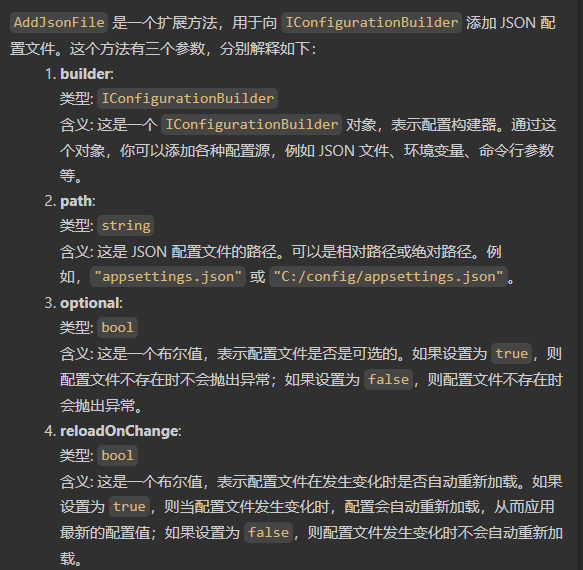
namespace Config40_45;
/// <summary>
/// 本解决方案用于演示在 .NET 6 中使用配置文件。,读取配置文件中的配置
/// </summary>
class Program
{
    static void Main(string[] args)
    {
        // 第一种方式读取配置文件(不常用)
        ConfigurationBuilder configurationBuilder = new ConfigurationBuilder();
        configurationBuilder.AddJsonFile("config.json"); // 添加配置文件
        IConfigurationRoot configurationRoot = configurationBuilder.Build();
        string? name = configurationRoot["name"];
        Console.WriteLine(name);
        string? msg1 = configurationRoot.GetSection("msg:msg1").Value;
        string? msg2 = configurationRoot.GetSection("msg:msg2").Value;
        Console.WriteLine(msg1+msg2);
    }
}
常用的读取方式
1、推荐使用选项方式读取,和DI结合更好,且更好利用"reloadonchange"机制。
2、NuGet安装: Microsoft.Extensions.Options、Microsoft.Extensions.Configuration.Binder,当然也需要Microsoft.Extensions.Configuration、Microsoft.Extensions.Configuration.Json.
3、读取配置的时候,DI要声明IOptions
- 实现方式
日志记录(nlog)
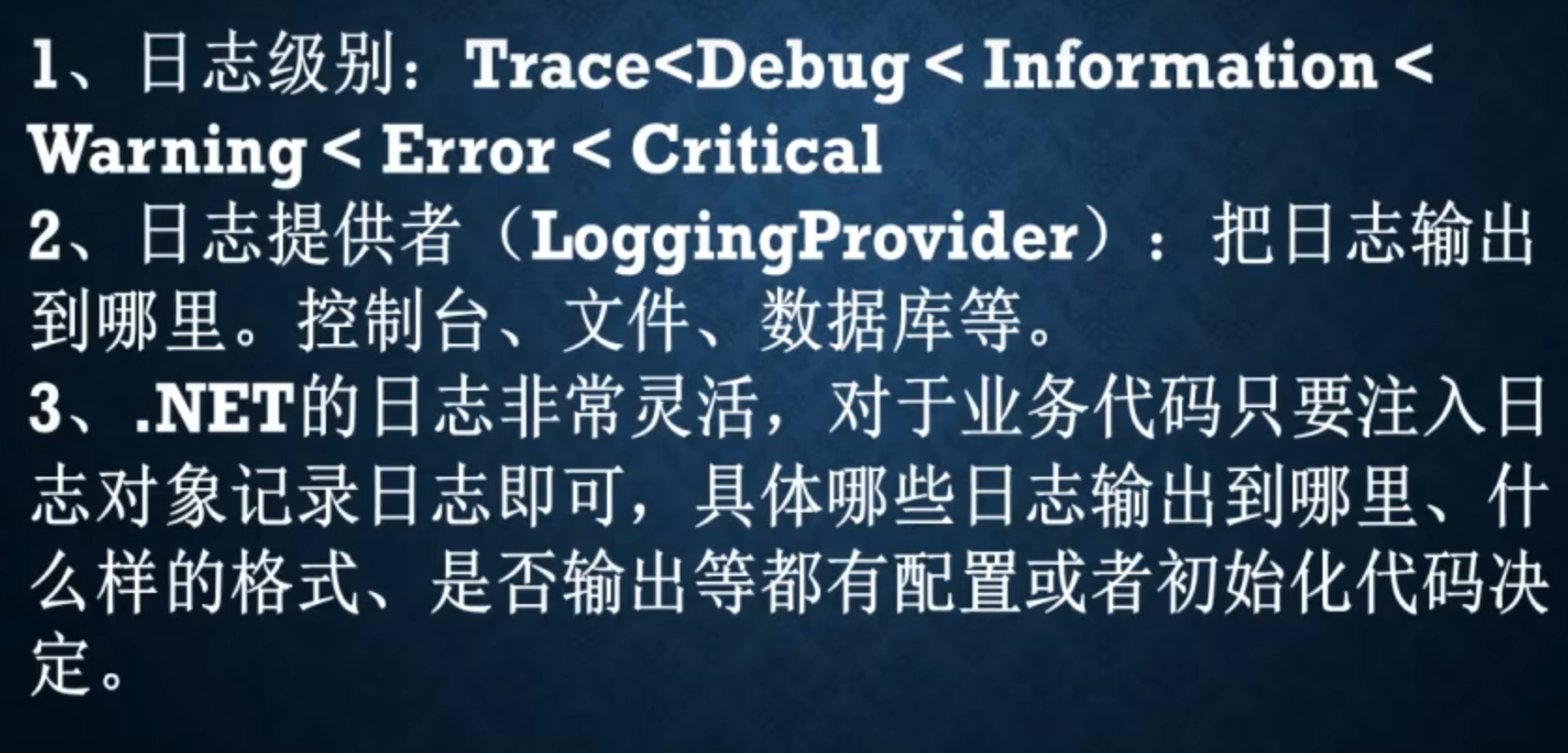
- NuGet:Microsoft.Extensions.LoggingMicrosoft.Extensions.Logging.Console.
- DI注入:services.AddLogging(logBuilder=> logBuilder.AddConsole;//可多个Provider);
- 需要记录日志的代码,注入ILoggerr
即可,T一般就用当前类,这个类的名字会输出到日志,方便定位错误。然后调用LogInformationO、LogError等方法输出不同级别的日志,还支持输出异常对象。
- 如何注入使用
class Program
{
    static void Main(string[] args)
    {
        ServiceCollection serviceCollection = new ServiceCollection();
        // 将nlog添加到日志系统中
        serviceCollection.AddLogging(log =>
        {
            log.AddConsole();
            log.AddNLog();
            log.SetMinimumLevel(LogLevel.Trace);
        });
        serviceCollection.AddScoped<Test01>();
        using (ServiceProvider sp =  serviceCollection.BuildServiceProvider())
        {
            Test01 requiredService = sp.GetRequiredService<Test01>();
            requiredService.TestLog();
        }
    }
}
配置文件
<?xml version="1.0" encoding="utf-8" ?>
<nlog xmlns="http://www.nlog-project.org/schemas/NLog.xsd"
      xmlns:xsi="http://www.w3.org/2001/XMLSchema-instance"
      autoReload="true"
      internalLogLevel="Info"
      internalLogFile="internal-nlog-AspNetCore.txt">

    <!-- enable asp.net core layout renderers -->
    <extensions>
        <add assembly="NLog.Web.AspNetCore"/>
    </extensions>

    <!-- the targets to write to -->
    <targets>
        <target xsi:type="File" name="defaultFilefile" fileName="log/log-${shortdate}.log"
                layout="${longdate}|${event-properties:item=EventId:whenEmpty=0}|${level:uppercase=true}|${logger}|${message} ${exception:format=tostring}" />

        <!-- archiveAboveSize 单个日志最大   maxArchiveFiles 日志文件最大数量   fileName 输出路径-->
        <target xsi:type="File" name="sysServicesFile" archiveAboveSize="10000" maxArchiveFiles="5" fileName="log/sysServicesFile-${shortdate}.log"
                layout="${longdate}|${event-properties:item=EventId:whenEmpty=0}|${level:uppercase=true}|${logger}|${message} ${exception:format=tostring}|url: ${aspnet-request-url}|action: ${aspnet-mvc-action}" />

        <target xsi:type="ColoredConsole" name="targetConsole" layout="${MicrosoftConsoleLayout}" />
    </targets>

    <!-- rules to map from logger name to target -->
    <rules>
        <logger name="*" minlevel="Warn" writeTo="targetConsole" />
        <!-- SystemServicesm 命名空间为SystemServices.*的日志,输出到sysServicesFile -->
        <logger name="SystemServices.*" minlevel="Info" writeTo="sysServicesFile" final="true" />
        <logger name="*" minlevel="Info" writeTo="defaultFilefile" />
    </rules>
</nlog>
- 解析 rules 1、rules节点下可以添加多个logger,每个logger都有名字(name属性),name是通配符格式的。 2、logger节点的minlevel属性和maxlevel属性,表示这个logger接受日志的最低级别和最高级别。 3、日志输出时,会从上往下匹配rules节点下所有的logger,若发现当前日志的分类名符合这个logger的 name的通配符,就会把日志输出给这个logger。如果匹配多个logger,就把这条日志输出给多个logger。但 是如果一个logger设置了final=“true”,那么如果匹配到这个logger,就不继续向下匹配其他logger了。

...